The fastest way to make a trading card of your pet is to upload one clear photo to the free Lohji app and generate a 4K Collectors Card, which takes a few minutes and costs nothing with the 10 welcome coins. If you want to design it yourself, use a Canva or printable template at the standard 2.5 × 3.5 inch size, add your pet’s photo and fun stats, and print at 300 dpi on heavy cardstock.
Last updated: January 2026
Trading cards are not just for ballplayers anymore. Police departments hand out cards of their K9 officers, shelters make baseball cards of adoptable cats, and pet parents are turning their own dogs and cats into collectible heroes for gifts, birthday parties and the fridge door. A good pet card is part keepsake, part inside joke, and part bragging rights.
This guide covers why pet trading cards caught on, the quickest way to make one in the Lohji app (App Store · Google Play), what to put on a card, how the DIY routes compare, how to print one so it looks and feels real, and a few fun ways to use your finished cards.
Why are pet trading cards so popular?
Trading cards tap into something most of us remember from childhood: the thrill of a stack of cards, the hunt for the one you are missing, and the fun of reading stats on the back. Put a pet on the front and the appeal doubles, because now the star is someone you actually know and love.
Some of the best examples come from police departments. In Eau Claire, Wisconsin, a local commercial photographer donated 20,000 K9 trading cards to area law enforcement, and officers handed them out mostly to children. The Charlotte County Sheriff’s Office in Florida released an 11-card set of its K9 deputies and invited families to say hello to a K9 deputy and ask for a card. In Eden Prairie, Minnesota, each K-9 and handler got a card with a photo and fun facts to share at community events. When Tewksbury, Massachusetts issued cards of 15 officers, Lt. Jim Williams told WBZ that “the kids really go for the dogs.”
In Norwood, Massachusetts, a school resource dog named Mustang Sally became the most popular card at a middle school, complete with special holiday versions. The real goal, officers say, is making people feel at ease.
“It’s an invisible bridge which is created when we hand out the cards and they receive that from us.”
Geoffrey Baguma, School Resource Officer, Norwood Police, via CBS Boston
Shelters have noticed too. Feline Frisky Adoption Center in Cooperstown, New York made baseball cards that showed personality points for each adoptable cat during a cards-and-cats event, and the shelter director wrote that some people who came just for the cards fell in love with a cat. For pet parents, the reasons are simpler. Cards make great small gifts, kids love collecting them, and a card captures your pet’s personality in a way a regular photo does not.

What is the fastest way to make a pet trading card?
There are four common routes. You can generate a finished card in an app, design one with a template tool like Canva, fill in a printable template by hand, or send a design to an online print shop. Here is how they stack up.
| Method | Time | Cost | Look |
|---|---|---|---|
| Lohji app 4K Collectors Card | A few minutes, including the one-time Base Lohji | Free for your first two cards (10 welcome coins); after that 4 coins a card, or about 30 cents each with the 40-coin pack ($2.99) | Your pet as a 3D animated-movie-style hero, with stats, badges and a limited edition barcode |
| Canva or a design template + your photo | About 20 to 45 minutes | Free to start; some features need a paid plan | Your real photo; polish depends on your design skills |
| Printable template + home printer | About 15 to 30 minutes plus cutting | Just cardstock and ink | Homemade and charming, edges may not be perfect |
| Online card printer | Under an hour to set up, then several days to ship | Priced per order; varies by quantity and finish | Clean cut, rounded corners, feels like a real store-bought card |
The app route wins on speed and on the wow factor, because you never have to pick fonts or line up a frame. The DIY routes win when you want your actual photo and full control over every word. Many families do both: a Lohji card for the hero shot, and a homemade card with their own stats for the back of the binder.
How do you make a 4K collector card in the Lohji app?
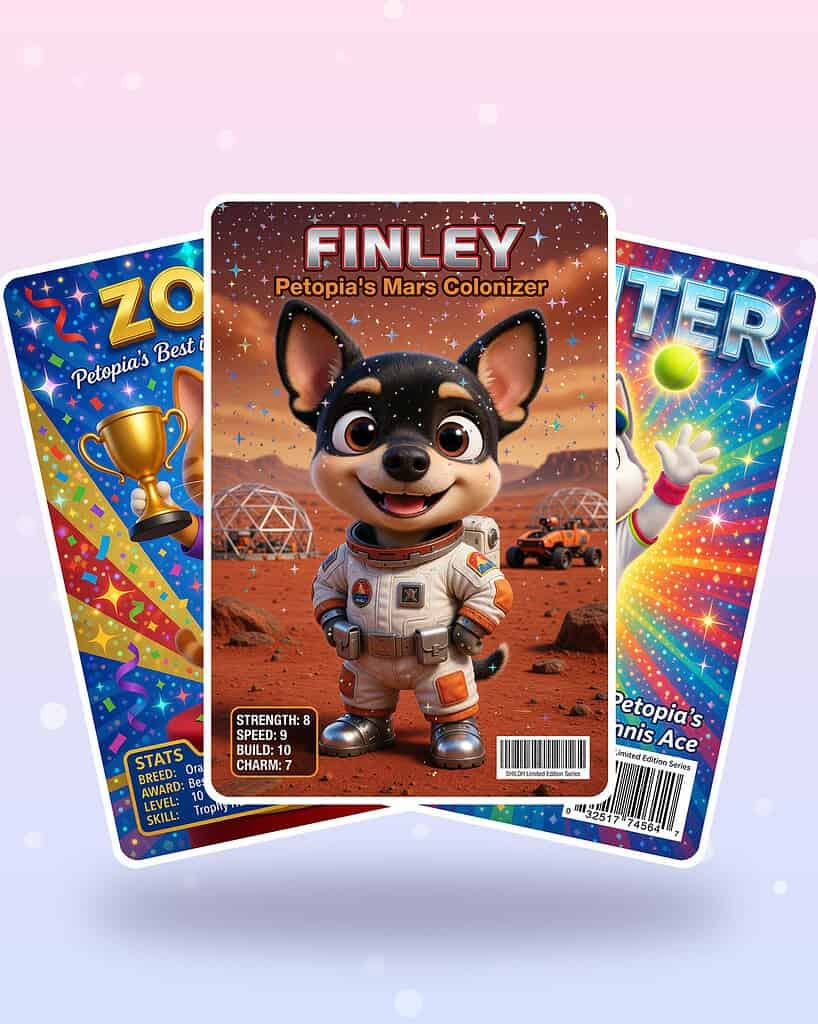
The Lohji app is the free app from Shiloh’s House. It turns one photo of your pet into a 3D character called a Base Lohji, and then uses that character to make everything else, including 4K Collectors Cards in a 2:3 trading card format. Here is the whole process from download to finished card.
Set up your account and your pet
- Download the app. Get the Lohji app on the App Store or Google Play, or start from shilohshouse.app/getlohji.
- Sign up with your phone number. You get a one-time text code, so there is no password to remember. New accounts start with 10 free Lohji Coins.
- Create your pet. Add your pet’s name and, if you like, a profile photo.
Make your Base Lohji
- Upload one clear photo. Pick a sharp, well-lit shot where your pet’s face and markings are easy to see. Natural light near a window works well, and a photo taken at your pet’s eye level usually beats one taken from above.
- Add optional details. You can set eye color, including heterochromia if your pet has two different colored eyes, and note distinguishing marks like a white blaze or a spotted ear.
- Review the reveal. Your Base Lohji costs 2 coins. On the reveal screen you can tap Try Again (1 coin), Try a New Look (2 coins), or Let’s Go when you love it. If you are counting on your welcome coins for two cards, tap Let’s Go on the first good result.
Generate your collector card
- Open Lohji Studio. Everything after the Base Lohji is made here, from your pet’s character.
- Choose the 4K Collectors Card format. Each card costs 4 coins.
- Pick a theme. Cards use “Petopia’s” hero themes, with about 100 to choose from. Petopia is the original story universe from Shiloh’s House. Not sure which one fits? Tap Surprise Me.
- Tap Generate. You can run up to five generations at once, and there is a mini-game to play while you wait.
- Save and share. Your cards land in the Library under the Cards tab. Press and hold a card to Save it to your photos, Share it, Favorite it, add it to a folder, or make it a profile picture.
What makes the cards feel collectible
Each card puts your pet’s name across the top in big title letters, gives them a hero title such as “Petopia’s Mars Colonizer” or “Petopia’s Tennis Ace,” and adds stats, badges and a “SHILOH Limited Edition Series” barcode, so it reads like a real hero card rather than a filtered photo. Cards are dealt from a deck you have not seen yet, which means you will not get a repeat until you have worked through the whole deck. That is part of the fun for kids who want to collect a full set of the family dog.
Card text follows the app’s language setting, and the app supports 16 languages, including Spanish, French, German, Japanese, Korean, Arabic and Hindi. That makes a nice touch for a gift going to grandparents or friends abroad.
When your welcome coins run out, coins come in one-time packs (40 coins for $2.99, 95 for $6.99, 210 for $14.99). This is not a subscription, coins never expire, and failed generations are refunded automatically. The app also has no ads and no ad trackers. For more ideas once your cards are done, see our guide to fun things to make in Lohji.
What should you put on a pet trading card?
A great pet card follows the same layout as a sports card. The front sells the star, and the back tells the story. If you are designing your own card, or writing a stats sheet to go with a Lohji card, these are the details that make people smile.
- Name and nickname. “Biscuit, a.k.a. The Couch Commander.”
- Breed or mix. “Beagle mix, 100% certified snack detector.”
- Birthday or gotcha day. Rescue parents often use adoption day as the card’s “rookie year.”
- Stats. Rate a few traits from 1 to 10 or 1 to 100. Popular ones are zoomies, snack power, nap skill, fetch accuracy, cuddle rating, bark volume and stealth.
- Special move. The signature trick, like “the sideways sock steal” or “the 3 a.m. hairball alarm.”
- Fun fact. One line only. “Has never once caught the laser dot.”
- Card number and set name. “Card 1 of 3, The Backyard Legends Series” makes a homemade set feel official.
Keep the text short. A standard card is only 2.5 inches wide, and the most-read part of any card is the big name and one standout stat. Police K9 cards follow the same rule: a strong photo up front and a few fun facts, not a biography.
How do you make a pet trading card with Canva or a template?
If you would rather use your real photo, a design tool is the way to go. Canva is the most popular free choice, with a drag-and-drop editor and a big library of card templates you can change colors, fonts and images on. Here is a simple routine that works in Canva or any similar tool.
- Start at the right size. Create a custom design at 2.75 × 3.75 inches. That is the 2.5 × 3.5 inch card plus 0.125 inch of bleed on every side, the extra edge printers trim off.
- Add a frame. A colored border at least an eighth of an inch thick hides small cutting errors and instantly looks like a real card.
- Drop in your photo. Use the largest original you have. Crop close so your pet’s face fills most of the frame.
- Add the name banner and stats. Bold name at the top or bottom, stats in a box on the back. Keep all text at least an eighth of an inch inside the trim line.
- Export for print. Download a high-resolution PDF or PNG. Check that the image is at least 300 dpi at final size, which is 750 × 1050 pixels for the card itself.
Prefer to skip the design work but still want a cartoon look? Our guides to turning your pet into a cartoon with AI and the best apps to cartoon your pet walk through the options. You can also save a Lohji card, then drop it into a Canva template to add your own back with homemade stats.
How do you print a pet trading card that looks real?
Printing is where a fun digital card becomes something kids can actually trade. Card printers agree on the basics: the standard trading card is 2.5 × 3.5 inches (63.5 × 88.9 mm), files should be 300 dpi at final size, and art that runs to the edge needs 0.125 inch of bleed.
A few more tips for a store-bought feel:
- Use heavy cardstock. Regular printer paper feels flimsy. A thick, smooth cardstock in matte or gloss gives the snap of a real card.
- Print a test sheet first. Lay out nine cards on one letter-size page, print on plain paper, and check the size against a real trading card before you use the good stock.
- Cut with a paper trimmer. Scissors wobble. A corner rounder punch is a cheap upgrade that makes homemade cards look professional.
- Or use a print shop. Online card printers handle cutting, rounded corners and coatings. Most offer a 2.5 × 3.5 inch “poker size” card and list a minimum image size in pixels.
- Protect the keepers. Slide each card into a soft penny sleeve, then into a 3 × 4 inch top loader. Ultra PRO recommends sleeving before loading so the card does not rub against the hard plastic.
What are fun ways to give or use pet trading cards?
Once you have a stack of cards, the fun really starts. Here are ideas families love.
- Birthday party favors. Make a card of the birthday pet and tuck one into every goody bag. For a pet’s birthday party, make a card for every dog guest.
- A family set. One card per pet, numbered as a series. Kids can trade duplicates with cousins.
- Gifts for grandparents. A framed card or a card in a top loader on a desk is a small gift that gets a big reaction.
- Memorial cards. A card for a pet who has passed, with their best stats and a favorite memory, is a gentle keepsake.
- Thank-you cards. Hand your pet’s card to the groomer, dog walker or vet tech who loves them.
- Rescue fundraisers. If you volunteer, cards of adoptable pets with personality points can draw people in, as shelters have found.
Your card art also works beyond paper. Use the same character as a phone wallpaper or a watch face, and see our list of personalized gifts for pet lovers for more ideas that star the pet.
Give your card star a real way home
The same Lohji app that makes your pet’s collector cards runs the Shiloh’s House Smart Tag. Show your pet’s Lohji or a photo on the tag’s profile, and anyone who finds your pet can call or text you in one tap.
Can your pet’s card character help keep them safe?
Yes, in a practical way. The Lohji app also powers the Shiloh’s House Smart Tag, a personalized NFC pet ID tag in premium acrylic with your pet’s name, your phone and address laser-engraved on the front and a “Tap Phone Here” NFC back. If your pet gets out, a finder taps the tag with any modern phone, no app needed, and a live profile opens.
That profile can show your pet’s photo or their Lohji, your choice, along with one-tap call, text and directions, your recorded voice messages, medical notes and several emergency contacts. You update it anytime in the free Lohji app, the same place your cards live. The tag is $38, waterproof, scratch-resistant and UV-stable, made in the USA, and comes in 35 designs with 30-day returns. See how it compares in our roundup of the best smart pet tags, or browse designs in the shop.
Frequently asked questions
How do I make a trading card of my pet for free?
Download the free Lohji app and sign up with your phone number. New accounts get 10 Lohji Coins, which covers a Base Lohji (2 coins) and two 4K Collectors Cards (4 coins each). For a photo-based card, a free design tool like Canva or a printable template at 2.5 × 3.5 inches works too, and you only pay for cardstock and ink.
What size is a standard trading card?
A standard trading card is 2.5 × 3.5 inches, or 63.5 × 88.9 mm, which is roughly a 5:7 shape. For printing, design at 2.75 × 3.75 inches to include 0.125 inch of bleed on each side, keep text an eighth of an inch inside the edge, and use at least 300 dpi, which is 750 × 1050 pixels.
Can I print a Lohji collector card?
Yes. Press and hold the card in your Library, save it to your photos, and print it like any image. Lohji cards are 2:3, a little taller than the standard 5:7 card, so fit the card to the 3.5 inch height and leave a slim border on the sides, or crop slightly. Printing on heavy cardstock gives the best feel.
What stats should I put on a dog or cat trading card?
Pick three to five traits that sum up your pet, and rate them from 1 to 10 or 1 to 100. Favorites include zoomies, snack power, nap skill, cuddle rating, fetch accuracy and stealth. Add a special move, a birthday or gotcha day, and one short fun fact. Keep it brief so the text stays readable at card size.
Can I make trading cards in other languages?
Yes, in the Lohji app. Card text follows the app’s language setting, and the app supports 16 languages, including English, Spanish, French, German, Portuguese, Italian, Chinese, Japanese, Korean, Arabic, Hindi and more. That makes it easy to create a card for a relative or friend who reads a different language. Homemade cards can be written in any language you like.
How do I protect printed pet trading cards?
Slide each card into a soft penny sleeve first, then into a rigid 3 × 4 inch top loader. The sleeve protects the surface from scratches and keeps the card from rubbing against the hard plastic, and the top loader prevents bends and dinged corners. For a collection, a binder with nine-pocket pages holds standard-size cards neatly.
Sources
- Report: Pet ownership expands as Gen Z shifts trends, PetfoodIndustry (APPA 2025 State of the Industry), 2025
- Massachusetts police departments using trading cards to connect with students, CBS Boston, 2024
- Local police department to handout K9 trading cards, WEAU, 2018
- CCSO release collectible K9 trading cards, Charlotte County Sheriff’s Office, 2020
- K-9 Trading Cards, City of Eden Prairie Police Department, 2020
- Tewksbury Police issue trading cards to connect with kids, WBZ NewsRadio 1030, 2022
- Cards & Cats Adoption Event, North Shore Animal League America, 2021
- FAQ on digital photos, pixels and image file types, MakePlayingCards (accessed 2026)
- Print file requirements, PrintMTG (accessed 2026)
- Trading card 2.5 x 3.5 template, Morris Publishing (accessed 2026)
- Free online card maker, Canva (accessed 2026)
- A top to bottom guide on toploaders, Ultra PRO, 2022